
Tidak ada produk di keranjang.
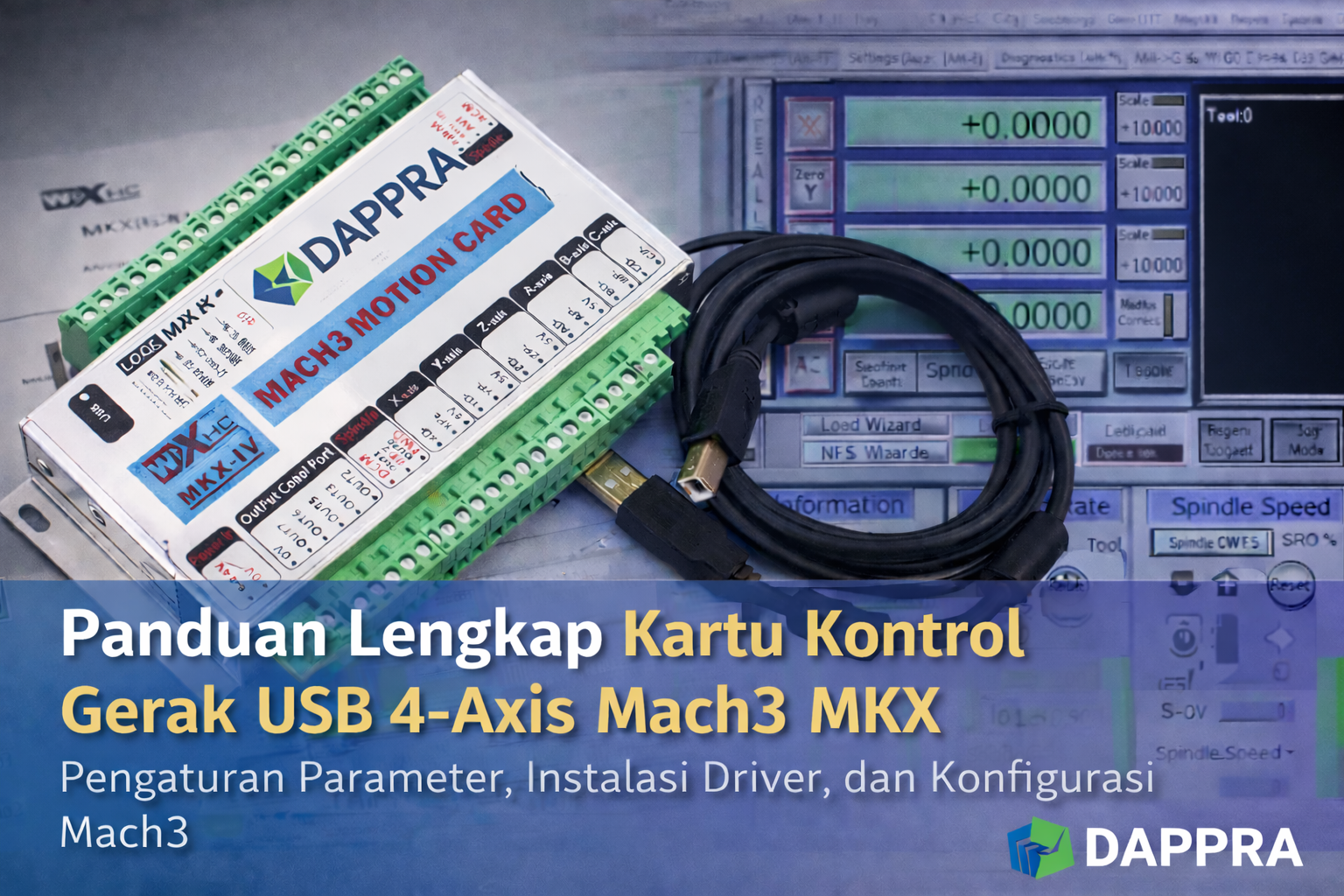
DAPPRA MKX Mach3 USB Motion Control CardUser Guide
Features
- Fully supports all Mach3 versions
- Full support for USB hot-swappable operation; the card monitors USB connection status at any time
- Supports up to 6 axes (depending on model)
- Maximum step pulse frequency: 2000 kHz
- Status indicator LEDs show USB connection and working status by flashing
- 16 general-purpose input ports
- Supports spindle speed feedback display in Mach3 in real time
- All I/O ports are optically isolated, providing strong interference resistance and stable performance
Simple Connection Description
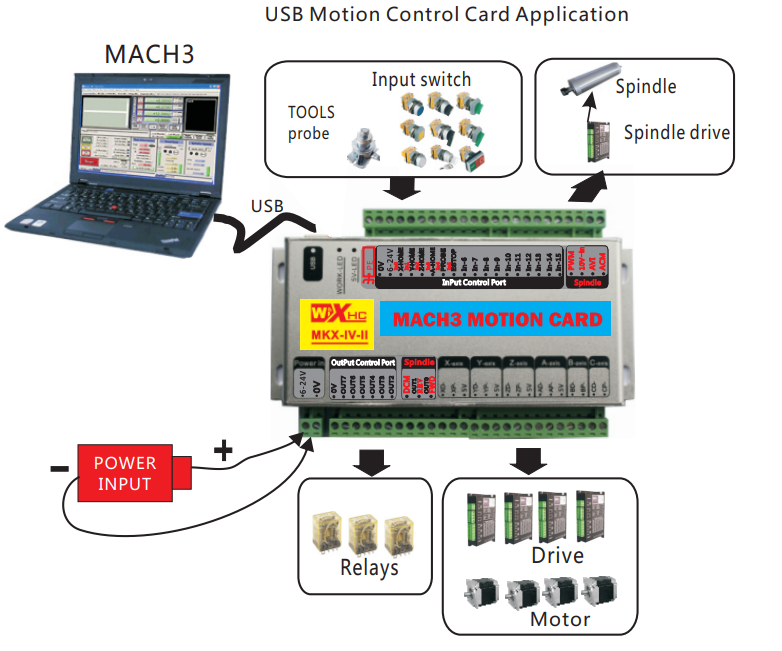
USB Motion Control Card Application
- Mach3
- Input switches
- Spindle
- Spindle drive
- Tool probe
- USB connection
- External power input
- Motor drives
- Relays
- Motors
Supported axis configurations:
- MK3-IV-II: 3-axis
- MK4-IV-II: 4-axis
- MK6-IV-II: 6-axis
Signal Description
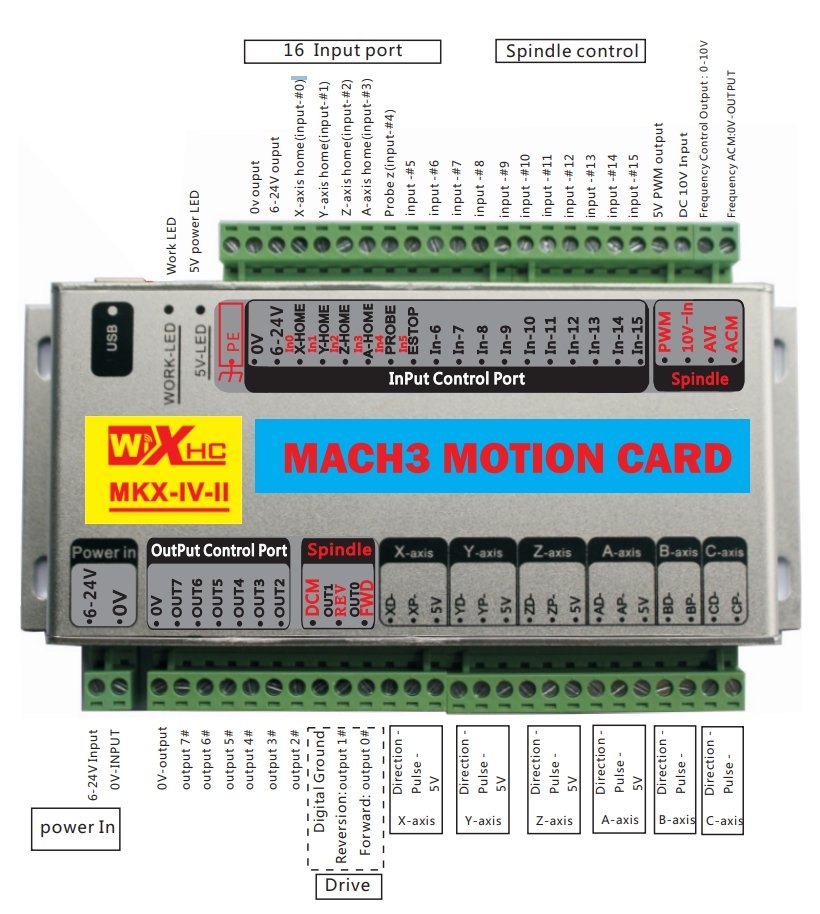
Wiring Diagram Notes
NOTE:
If the inverter is turned on and the control card does not work properly, the issue is usually caused by electromagnetic interference from the inverter.
Please replace the inverter or apply proper anti-interference measures.
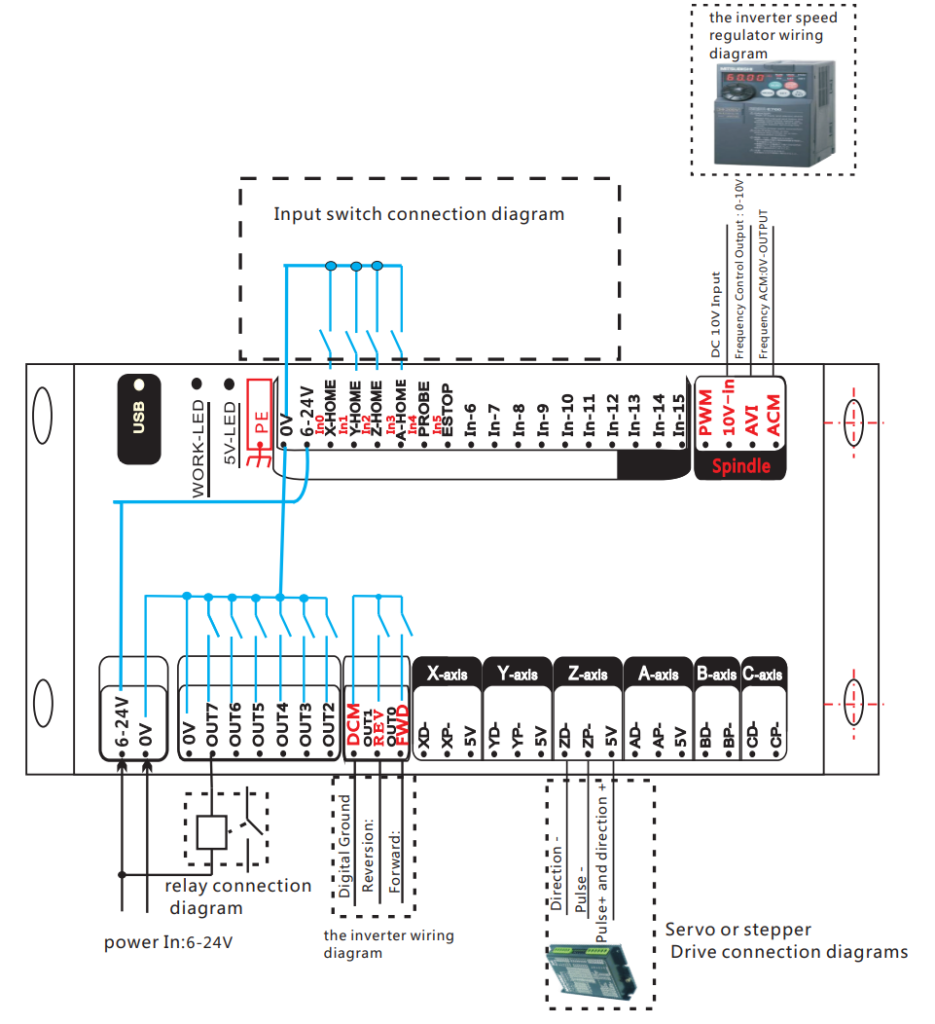
Included wiring diagrams cover:
- Inverter speed regulator wiring
- Input switch connection
- Relay connection
- Servo or stepper drive connections
- Power input (6–24 V DC)
- Inverter control wiring
Electrical Characteristics
Axis Output Control
- Output type: Isolated open collector output
- Output voltage/current: 5 V, 20 mA
- Drive mode: Pulse + Direction
- Maximum output frequency: 2000 kHz
- Supported axes:
- MK3: 3-axis
- MK4: 4-axis
- MK6: 6-axis
- Isolation voltage: 3.5 kV
Spindle Control Output
- Analog voltage output: 0–10 V
- Output modes supported:
- PWM output: 5 V, 1 kHz, duty cycle 0–100%
- Pulse + Direction output: 5 V, 15 Hz to 4 kHz
I/O Characteristics
- Output ports: 8 channels
- Drive current: up to 50 mA, maximum voltage 25 V
- Isolation voltage: 3.5 kV
- Input ports: 16 isolated inputs
- Input current: 5 mA
- Maximum input voltage: 25 V
- Isolation voltage: 3.5 kV
USB Interface
- Complies with USB 2.0 standard
- Supports full-speed transmission mode
Operation Steps
Step 1: Install Mach3 Software
Double-click the file Mach3Version3.043.066.exe provided with the product and complete the stallation.
Step 2: Copy the Driver Files
Copy the USB card driver files to the specified Mach3 directory.
Refer to the file:usb card driver-v2.38.9/readme.txt
Step 3: Connect the Control Card
Refer to the wiring schematics to ensure correct connection of the control card.
Step 4: Connect USB Cable
Connect the control card to the computer using a USB cable.
After completing the above steps, you can open the Mach3 software and begin operation.
Refer to the printed manual “Mach3 Parameter Settings” to configure parameters such as pulse equivalent settings.
Wiring Schematics Overview
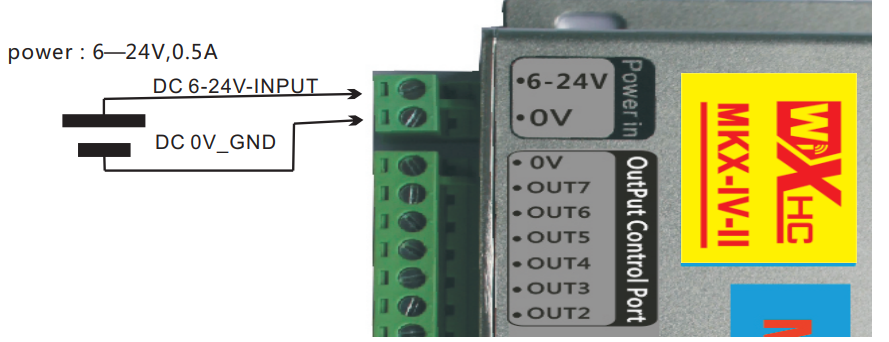
Power Input
- DC input voltage: 6–24 V
- Recommended current: 0.5 A
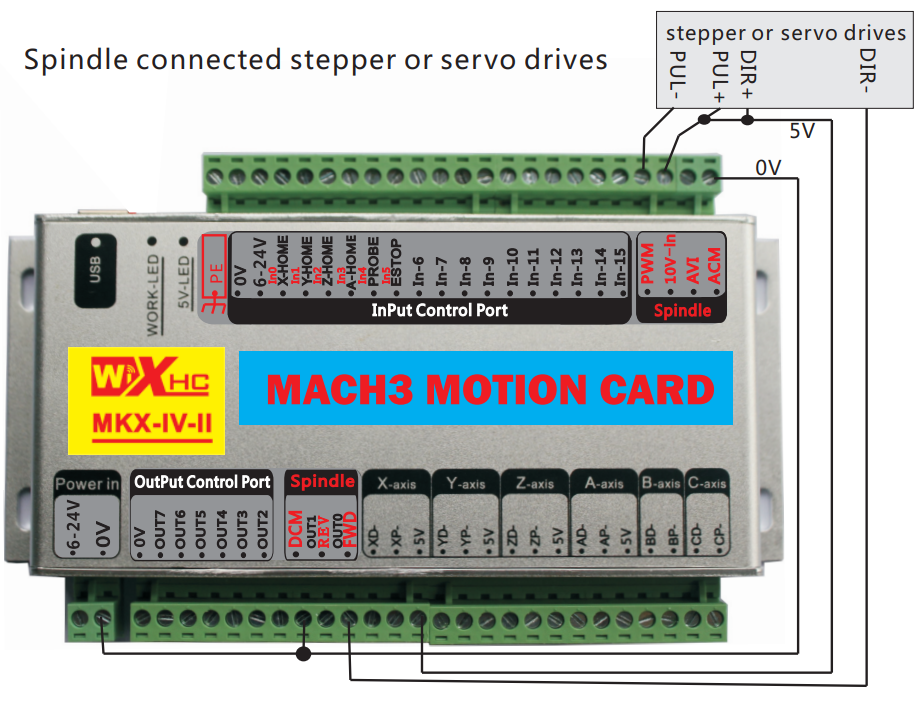
Drive Interface
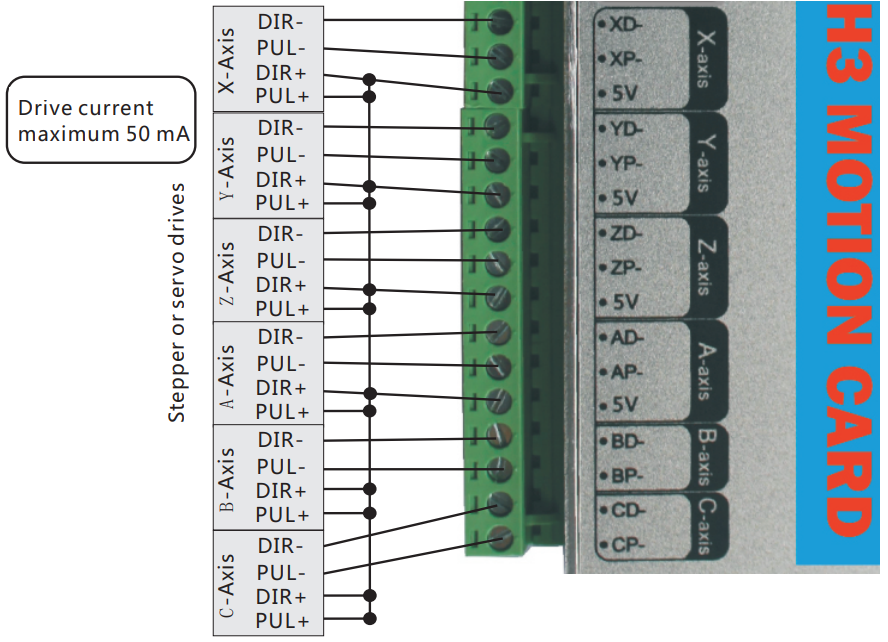
- Supports stepper or servo drives
- Pulse + Direction output
- Common-anode wiring method
- Maximum drive current: 50 mA
Spindle Control Interface
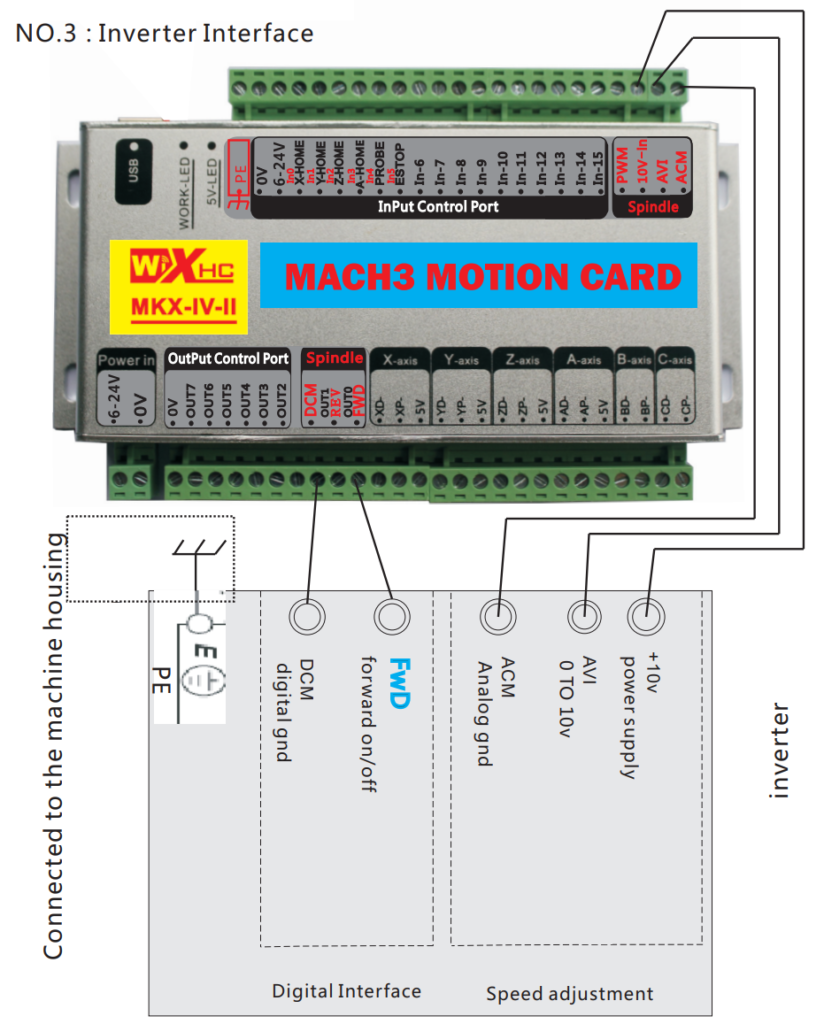
- Supports inverter-based spindle control
- Digital and analog speed control interfaces
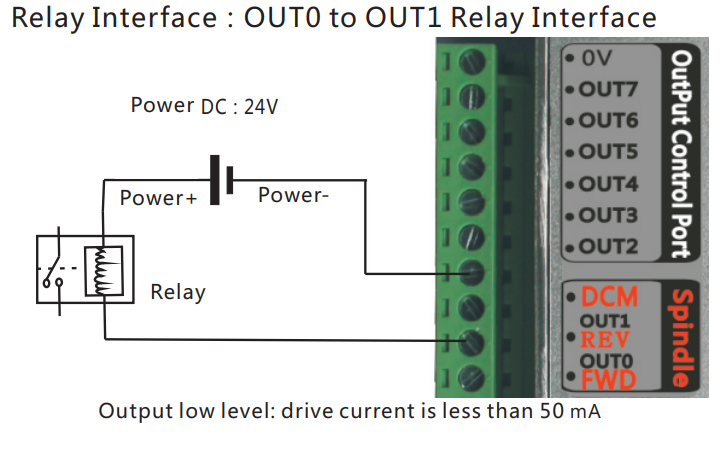
Relay Output Interface
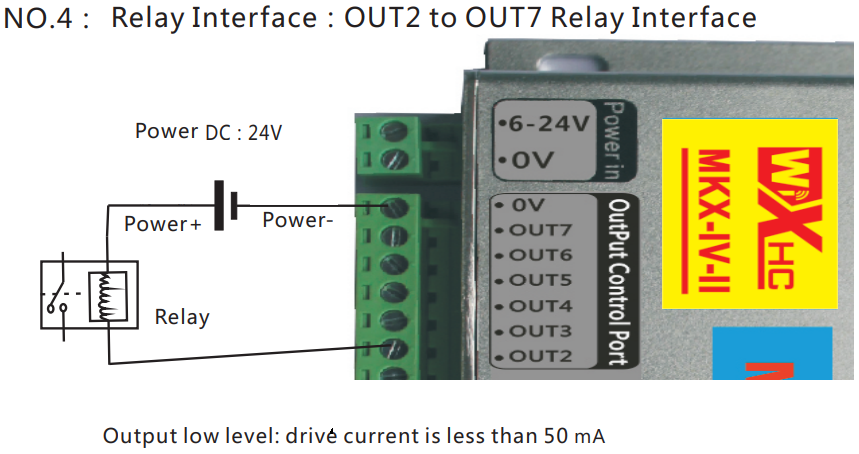
- Output ports: OUT0 to OUT7
- Output type: Active low
- Maximum drive current: 50 mA
Input Interface
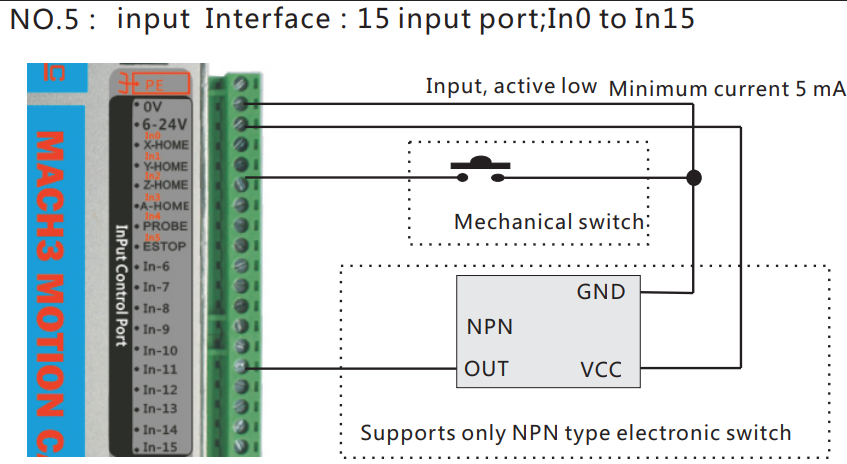
- Input ports: IN0 to IN15
- Input type: Active low
- Minimum input current: 5 mA
- Supports NPN-type electronic switches only
In Mach3-based CNC systems, selecting a stable and compatible motion control card is critical for accurate motion control and reliable machine operation. This tutorial uses the DAPPRA KA05 Mach3 USB Motion Control Card as an example. All wiring, software configuration, and Mach3 parameter settings described below are based on this controller.
If you would like to view detailed product information and specifications, please visit the DAPPRA KA05 Mach3 USB Motion Control Card product page .
Product Selection Table – Mach3 Motion Control Cards
Use the table below to quickly select the most suitable Mach3 motion control card based on axis count, communication interface, and MPG handwheel support.
| Model Category | Axis Support | Interface | Mach3 Support | MPG Handwheel | Typical Applications |
|---|---|---|---|---|---|
| Mach3 Control Card | 3 Axis | USB | ✔ All Versions | Wired / Wireless | Entry-level CNC routers, engraving machines |
| Mach3 Control Card | 4 Axis | USB | ✔ All Versions | Wired / Wireless | Standard CNC routers, rotary axis applications |
| Mach3 Control Card | 6 Axis | USB | ✔ All Versions | Wired / Wireless | Advanced CNC systems, multi-axis linkage |
| Mach3 Control Card | 3 Axis | Ethernet | ✔ All Versions | Wired / Wireless | Industrial CNC with higher stability requirements |
| Mach3 Control Card | 4 Axis | Ethernet | ✔ All Versions | Wired / Wireless | CNC machines with rotary axis and long cable runs |
| Mach3 Control Card | 6 Axis | Ethernet | ✔ All Versions | Wired / Wireless | Professional multi-axis CNC and automation systems |
How to Choose the Right Model
- Choose 3-axis if your machine is a standard CNC router or engraver
- Choose 4-axis if you need a rotary axis or more flexible machining
- Choose 6-axis for complex motion control or multi-axis linkage
- Choose USB for easy setup and general applications
- Choose Ethernet for better noise immunity and industrial environments
- Add MPG (wired or wireless) if precise manual jogging and setup are required
Product Links
For detailed specifications, pricing, and ordering information, please visit the product pages below:
3-Axis Mach3 USB Motion Control Card (KA03)
👉 View Product Details
4-Axis Mach3 USB Motion Control Card (KA05)
👉 View Product Details
Mach3 USB Wireless 4-Axis MPG Pendant Handwheel (KA02)
👉 View Product Details
Mach3 USB Wireless 6-Axis MPG Pendant Handwheel (KB05)
👉 View Product Details














Tambah komentar
Anda harus masuk untuk berkomentar.